Movie Recommendations (MovieLens)
This tutorial demonstrates how to configure a recommendation engine using the 100k-MovieLens dataset. The dataset contains 100,000 ratings from approximately 1000 users on 1700 movies. This example uses the local table connector; the same approach applies to other supported connectors.
CLI Setup
Install the CLI
pip install nextgres-side
SIDE Engine supports Python 3.8 to 3.11. See installation instructions if you need to install pip.
Initialize the CLI
side init --api-key <YOUR_API_KEY>
If you don't have an API key, see How to get an API key.
Data Preparation
Download the dataset
CLI
wget http://files.grouplens.org/datasets/movielens/ml-100k.zip --no-check-certificate
unzip ml-100k.zip
The dataset contains three tab-separated files:
ml-100k/u.data: Ratingsml-100k/u.user: Usersml-100k/u.item: Movies
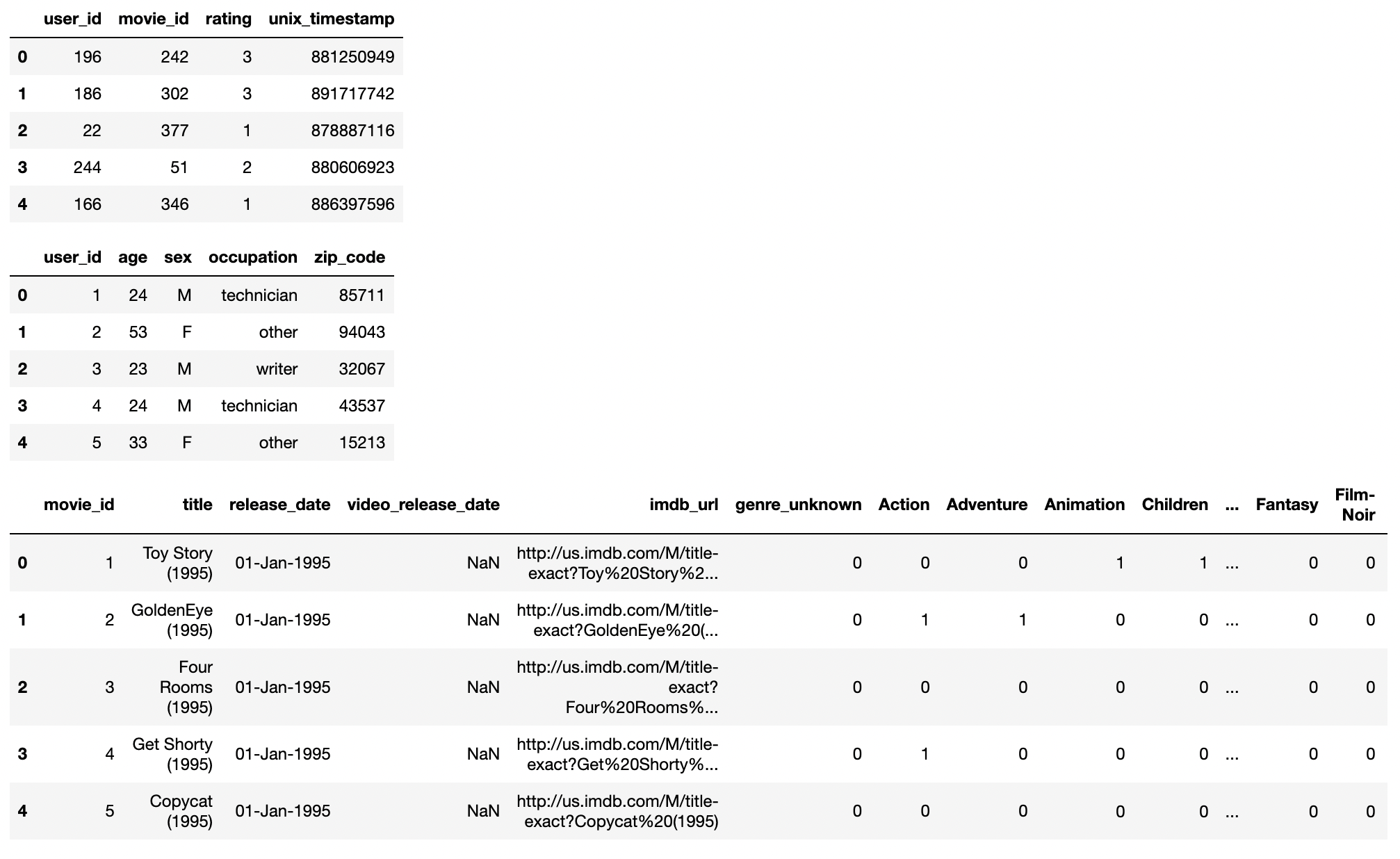
The TSV files lack headers, which are required. Add a header to the ratings file:
(echo -e "user_id\titem_id\trating\ttimestamp"; cat ml-100k/u.data) > ml-100k/u.data_with_header
This tutorial uses only interaction data. To include user and item data, follow the same pattern.
Create the table
Create a table and insert ratings using create-table-from-uri:
CLI
side create-table-from-uri --name movielens_ratings --path ml-100k/u.data_with_header --type tsv
Records upload in batches of 1000. Wait until all 100k records are uploaded.
Create the engine
This example uses ratings to build a collaborative filtering engine. Higher ratings indicate stronger user preference.
Engine configuration:
movielens_movie_recommendations.yaml
data:
  interaction_table:
    type: query
    query: |
      SELECT user_id, item_id, timestamp AS created_at, rating AS label
      FROM movielens_ratings
training:
  models:
    - name: als
      policy_type: als
Create the engine:
side create-engine --file movielens_movie_recommendations.yaml
For details on engine configuration, see Engines documentation.
Monitor engine status
Engine creation and training can take several hours, depending on data volume and attributes. Check status:
side list-engines
Response:
[
    "engines": {
        "created_at": "2023-03-18T19:17:51 UTC",
        "engine_name": "movielens_movie_recommendation",
        "engine_uri": "https://api.nextgres.ai/v2/engines/movielens_movie_recommendation",
        "status": "FETCHING",
    }
]
The engine progresses through these stages:
SCHEDULINGFETCHINGTRAININGDEPLOYINGACTIVE
Once the status is ACTIVE, the engine is ready for queries.
Query recommendations
Query recommendations using the Query endpoint. Provide a user_id and the number of results to return.
Using the CLI:
side query --engine-name movielens_movie_recommendation \
  --query "SELECT * FROM similarity(embedding_ref='als', limit=50, encoder='precomputed_user', input_user_id='\$user_id') LIMIT 5" \
  --parameters '{"user_id": "1"}'
Response:
{
   "results": [
      {
         "id": "427010",
         "score": 0.9
      },
      {
         "id": "182094",
         "score": 0.8
      },
      {
         "id": "332874",
         "score": 0.7
      },
      {
         "id": "827918",
         "score": 0.3
      },
      {
         "id": "403528",
         "score": 0.2
      }
   ]
}
The response contains an array of result objects with movie IDs and scores.
Using the REST API:
curl https://api.nextgres.ai/v2/engines/movielens_movie_recommendation/query \
  -H "x-api-key: <API_KEY>" \
  -H "Content-Type: application/json" \
  -d '{
    "query": "SELECT * FROM similarity(embedding_ref=''als'', limit=50, encoder=''precomputed_user'', input_user_id=''$user_id'') LIMIT 5",
    "parameters": {
      "user_id": "1"
    }
  }'
Clean up
Delete the engine when finished:
side delete-engine --engine-name movielens_movie_recommendation